Stromkosten senken mit Echtzeitdaten
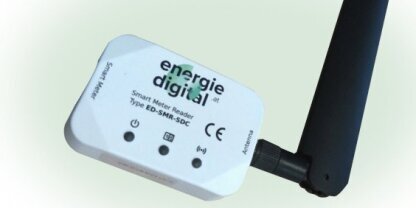
Mit dem Smart Meter Reader von energiedigital Echtzeitdaten übertragen und Stromkosten senken.
Long text example
Lorem ipsum dolor sit amet consectetur adipiscing elit. Quisque faucibus ex sapien vitae pellentesque sem placerat. In id cursus mi pretium tellus duis convallis. Tempus leo eu aenean sed diam urna tempor. Pulvinar vivamus fringilla lacus nec metus bibendum egestas. Iaculis massa nisl malesuada lacinia integer nunc posuere. Ut hendrerit semper vel class aptent taciti sociosqu. Ad litora torquent per conubia nostra inceptos himenaeos.
Lorem ipsum dolor sit amet consectetur adipiscing elit. Quisque faucibus ex sapien vitae pellentesque sem placerat. In id cursus mi pretium tellus duis convallis. Tempus leo eu aenean sed diam urna tempor. Pulvinar vivamus fringilla lacus nec metus bibendum egestas. Iaculis massa nisl malesuada lacinia integer nunc posuere. Ut hendrerit semper vel class aptent taciti sociosqu. Ad litora torquent per conubia nostra inceptos himenaeos.
Features example
Heading
Some text
Heading
Some text
Heading
Some text
Heading
Some text
Accordion example
Accordion Item #1
.accordion-body, though the transition does limit overflow.Accordion Item #2
.accordion-body, though the transition does limit overflow.Accordion Item #3
.accordion-body, though the transition does limit overflow.This is some cta heading
This is cta description giving more info